
Ever felt like you needed an assistant who never sleeps, knows a little bit of everything, and can write a travel itinerary, debug code, or draft an email in seconds? That’s ChatGPT in a nutshell.
Whether you use it every day or you’re just getting started, ChatGPT has evolved far beyond a simple text box. With major updates rolling out across OpenAI’s latest GPT-5 architecture including natural voice, deep web search, and smarter memory it’s changing how we work, learn, and create.
Here is a straightforward, beginner-friendly look at what ChatGPT actually is, what it costs, and how to get the most out of it.
What Is ChatGPT?

At its core, ChatGPT is an artificial intelligence chatbot developed by OpenAI. You give it a prompt—a question, a command, or a rough idea—and it reads your request and generates a human-like response in seconds.
It doesn’t “think” like a human, but it reads vast amounts of text and patterns to predict the best possible answer. You can talk to it just like you would a knowledgeable friend or colleague.
In simple terms: ChatGPT acts like a digital Swiss Army knife for your everyday tasks. It writes, summarizes, translates, codes, and brainstorms.
Key Features You Can Use Today
ChatGPT has expanded far beyond simple text generation. Today, it functions as a multi-talented digital assistant:
- Natural Voice Conversations: Talk directly through your phone or desktop app for hands-free brainstorming, language practice, or quick Q&As.
- Real-Time Web Browsing: Fetch current news, weather, or real-time research with citations attached.
- Image & Document Analysis: Upload photos, receipts, spreadsheets, or long PDFs. Ask ChatGPT to summarize the document, translate a menu, or identify what’s inside a photo.
- Smart Memory (Dreaming V3): ChatGPT remembers your past project details, tone preferences, and background info across conversations, so you don’t have to repeat yourself every time.
- Built-in Image Creation: Describe an image in natural words, and the AI generates detailed artwork, logos, or photo concepts directly in your chat thread.
ChatGPT Model Breakdown: Free vs. Paid Options
OpenAI offers several model tiers inside ChatGPT, ranging from lightning-fast options for everyday questions to deep-reasoning powerhouses for hard problem-solving.
| Feature / Tier | Free Plan | Plus Plan ($20/mo) | Pro / Business Plans |
| Best For | Casual queries, quick drafts, light research | Daily personal use, heavy writing, creative tasks | Professionals, coders, and team collaboration |
| Default Intelligence | Fast, standard models (GPT-5.3 Instant) | High reasoning (GPT-5.5 / GPT-5.6 Terra) | Frontier reasoning (GPT-5.6 Sol) |
| Usage Limits | Standard caps during peak hours | Significantly higher message limits | Highest priority access & unlimited compute |
| Voice & Memory | Standard voice & basic memory features | Advanced Voice & expanded contextual memory | Enterprise-grade privacy, shared team memories |
5 Practical Ways to Use ChatGPT in Daily Life
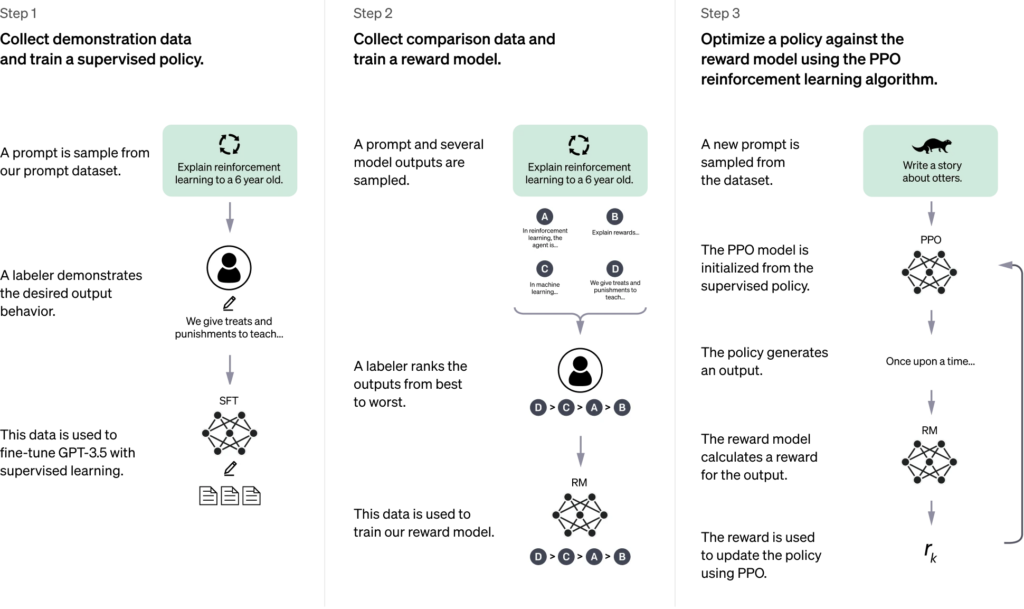
If you aren’t sure where to start, here are five everyday ways to make ChatGPT useful right away:
- Plan Out a Trip: Type “Give me a 3-day budget itinerary for Paris focused on hidden gems and bakery visits.”
- Simplify Hard Topics: Type “Explain quantum computing to me like I’m a 10-year-old.”
- Upgrade Your Writing: Paste a draft email and type “Make this sound professional, clear, and polite.”
- Meal Prep on a Budget: List what’s sitting in your fridge and ask for three easy dinner recipes you can make in under 20 minutes.
- Learn a Skill: Practice speaking a foreign language by activating Voice Mode and asking ChatGPT to hold a beginner-level conversation with you in Spanish or French.
Common Mistakes to Avoid
While ChatGPT is impressively smart, it isn’t perfect. Avoid these common traps to get better results:
- Accepting facts without checking: AI can occasionally “hallucinate” or present incorrect information with complete confidence. Always verify critical details like health advice, legal rules, or financial data.
- Writing vague prompts: Asking “Write an essay about fashion” yields bland results. Asking “Write a fun, 300-word overview of 90s streetwear trends for a casual blog” gives you something great.
- Sharing personal data: Avoid pasting sensitive bank information, private passwords, or confidential company secrets into the chat bar.
Final Thoughts
ChatGPT isn’t meant to replace human creativity, judgment, or storytelling—it’s meant to speed up the tedious parts of your day so you can focus on what matters. Whether you’re checking out the free tier or diving into advanced tools, taking five minutes to test out a few prompts is the fastest way to discover what it can do for you.
Frequently Asked Questions
Is ChatGPT completely free to use?
Yes, OpenAI offers a permanent free version of ChatGPT. It allows you to ask questions, draft text, analyze files, and browse the web with basic limits.
How do I access ChatGPT?
You can use ChatGPT online by visiting chatgpt.com on any browser, or by downloading the official ChatGPT app on iOS, Android, macOS, or Windows.
Can ChatGPT replace search engines like Google?
Not entirely. While ChatGPT gives direct, conversational answers and browses the web for real-time information, search engines remain essential for browsing multiple sources, verifying local businesses, or comparing live shopping results.
Does ChatGPT remember what I tell it?
Yes, if you have the Memory feature turned on, ChatGPT saves key facts you share (like your job title, preferences, or writing style) to make future responses more personalized. You can view or clear these memories anytime in your settings.
For more updates visit: STORY VISTA